Custom Words
Add names and terms that dictation often gets wrong. Keep optional corrections and spoken snippets in the same list.
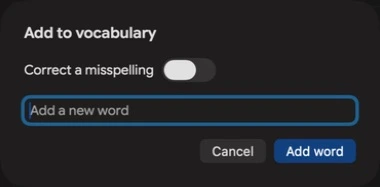
A word, or a correction
Vocabulary: add “Figma” to help the new Fast engine recognise that term.
Correction: add “fig ma → Figma” to replace a recurring mishearing in the final text.
Before 5.6.0 this list was mainly word replacements. Existing pairs still work; an exact word no longer needs a correction pair. Recognition improvements are not guaranteed for every utterance or model.
Two Ways to Use Custom Words
1Fix Misrecognized Words
Add names, technical terms, and uncommon words in their correct spelling. With the new Fast engine, eligible terms can help recognition itself. For a consistent text change, turn on Correct a misspelling and add a correction pair.
2Create Text Snippets
Say a trigger phrase and have it expand into longer text. Perfect for addresses, signatures, or anything you type repeatedly.
How to Set Up
- 1Open Speakmac and choose Words & Text in the sidebar
- 2Go to Custom Words
- 3Click Add and enter the exact word or phrase
- 4Leave Correct a misspelling off for vocabulary alone. Turn it on to enter the correction, then save.
Pro Tips
- •Final authority: correction pairs run after cleanup, so your chosen replacement wins in the final text.
- •Snippets: use a distinct, easy-to-say trigger phrase and put the expanded text in its correction.
- •Add common mistakes: If Speakmac keeps mishearing a word, add all the variations
- •Multi-line text: Snippets can include line breaks for signatures or formatted text
Need help? [email protected]
Ready to customize?
Download Speakmac
Get the app and set up your custom words for perfect transcription.
Requires macOS 14+. Supports Apple Silicon and Intel Macs.