Type with Voice
Anywhere on your PC
Talk instead of type, in any Windows app. Private, fast, on-device.
$29 once. No subscription, ever.
Why Speakmac?
Private by Design
Voice recordings are transcribed locally on your PC. Your audio never leaves your machine.
Blazing Fast
Optimized to run on-device. It feels instant because it is. No round-trip to a server halfway across the world.
No monthly subscriptions. No "credits". Just a simple, honest software license.
It knows grammar so you don't have to.
Speak casually. Speakmac handles the commas, periods, and capitalization instantly. It's like having an editor in your clipboard.
Faster than your fingers.
Text lands in your active window in under half a second. By the time you release the hotkey, your thought is already on the screen.
Lightweight app. Zero bloat.
A background app that respects your RAM. No Electron, no web wrappers — just fast, optimized native code.
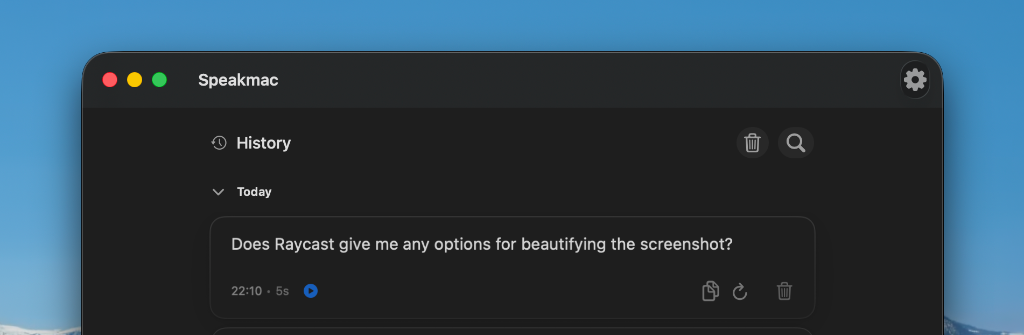
Polished, Native UI.
A clean interface that feels right at home on Windows. Designed with care to look and feel premium.
 Cursor
 Perplexity
 Claude
 Notion
 Superhuman
 Gmail
Gmail Google Docs
 Slack
Slack Notes
Notes25 languages by default. More with local packs.
Choose the local dictation path that fits your language and Mac.
Subscriptions cost $12 every month. Speakmac costs $29 once.
If you don't love it within 14 days, we refund you. No questions asked.
Simple, transparent pricing
No subscriptions, no hidden fees. Buy once, own forever.
Speakmac
Best valueOne license. Both your Windows PCs.
2 PCs included
Lifetime license
No subscriptions. No recurring billing. The app is yours.
12 months of updates
Get new features and compatibility updates for a full year.
Private by design
Your dictated audio and transcript text stay on your PC.
14-day money-back guarantee
Personal · 1 Mac
Perfect for this Mac
1 Mac included
Lifetime license
No subscriptions. No recurring billing. The app is yours.
12 months of updates
Get new features and compatibility updates for a full year.
Private by design
Your dictated audio and transcript text stay on your PC.
14-day money-back guarantee


Enterprise plans for 3+ seats — [email protected]
Frequently asked questions
Is this a subscription?
No. Pay once. The app is yours forever. Your purchase includes 12 months of updates, and the version you have keeps working after that.
Does my voice go to the cloud?
No. Dictation runs locally, so your dictated audio and transcript text stay on your PC.
Do I need any API key or account?
No accounts or logins required. One-time setup, then it works forever.
Which Windows versions are supported?
Speakmac targets Windows 10 and 11 on modern hardware. Join the waitlist and we'll confirm your exact setup before launch.
Does it work in every app?
That's the goal — if there is a blinking cursor, Speakmac can type there. Browsers, editors, chat apps, docs.
When can I actually download it?
The Windows build is in active development. Press download to join the waitlist — you'll be first to get it, at the launch price you see here.

hey! I'm JD
maker of Speakmac
I built Speakmac because I was frustrated. I was spending $12 a month on transcription, more than my ChatGPT subscription. It felt wrong.
Voice typing should be simple and affordable. You shouldn't need a subscription just to talk instead of type.
Speakmac is already trusted by thousands of people, and Windows users kept asking for it. Modern PCs are powerful enough to transcribe on their own — locally, privately, in under half a second.
So I'm building the Windows version next. Join the waitlist and you'll be first in line at the launch price.